
How to Repurpose a Podcast into Short Clips (Step-by-Step)
How to Repurpose a Podcast into Short Clips (Step-by-Step)
A single podcast episode can contain dozens of shareable moments. Most creators publish once and move on, leaving hours of high-value content sitting untouched. Repurposing that audio and video into short clips multiplies your reach without multiplying your production time — you're drawing on work you've already done. This guide walks through every stage of that process, from goal-setting to scaling a repeatable pipeline.
Step 1: Define Goals and Target Audience for Your Clips
Clarify Outcomes
Before you export a single frame, get specific about what the clips are supposed to accomplish. Are you trying to drive followers on Instagram? Push traffic back to the full episode? Generate leads for a product mentioned in the conversation? The answer shapes every decision downstream, from which moments you pull to how you write the call-to-action.
Map Audience Needs
Identify which platforms your actual audience uses — YouTube Shorts, TikTok, Instagram Reels, LinkedIn — and resist the temptation to be everywhere at once. A B2B podcast with a professional audience will perform differently on LinkedIn than it will on TikTok. Document the pain points, interests, and questions your listeners bring to each platform so you can match extracted moments to those needs rather than posting randomly.
Set Success Metrics
Vague goals produce vague results. Set measurable KPIs before the first clip goes live: view-through rate, saves, shares, click-through to the full episode, or new subscribers per week. These numbers give you a feedback loop so the process keeps improving.
Step 2: Select the Right Episodes and Standout Moments
Shortlist High-Potential Episodes
Not every episode deserves the same attention. Prioritize recordings with timely topics, prominent guests, or episodes that already showed high engagement through downloads, comments, or social mentions. A guest with 50,000 LinkedIn followers, for example, becomes a natural distribution partner once the clips are live.
Spot Clip-Worthy Hooks
The best podcast clips share a common structure: they open with something that stops the scroll and close with a clear payoff. Look for self-contained insights, contrarian takes, genuine "aha" moments, and step-by-step how-tos. These formats work across every platform because they deliver value in under 90 seconds without requiring context the viewer doesn't have.
Time-Stamp Highlights
As you review an episode, mark every potential 15–90 second segment with a timestamp. Use chapter markers if your hosting platform supports them, and scan listener comments for lines people already quote back — those are pre-validated clip candidates. The goal is a shortlist of four to eight segments per episode before any editing begins.
Step 3: Transcribe and Annotate for Speed and Accuracy
Generate Transcripts
Manual review of a 60-minute episode is slow. Run automated transcription — tools like Descript, Otter.ai, or your editing software's built-in engine — to surface quotable lines in minutes rather than hours. Accuracy rates above 90% are standard for clear audio, and you only need to clean up the segments you plan to use.
Tag Themes
Once the transcript exists, annotate each flagged segment with a theme tag: "tip," "myth-bust," "personal story," "data point," "hot take." This makes podcast repurposing far more systematic. When you sit down to produce LinkedIn content one week and Reels the next, the tags let you filter for exactly the right tone without re-reading the entire document.
Create a Clip Map
Pull the timecodes for every flagged segment, note who is speaking, and log the theme tag in a simple spreadsheet or project management tool. While you're at it, flag anything that might require a second look — rights-restricted music in the background, sponsor mentions that are now outdated, or content that's too niche for a general audience.
Step 4: Choose Clip Formats and Platform Specs
Match Format to Channel
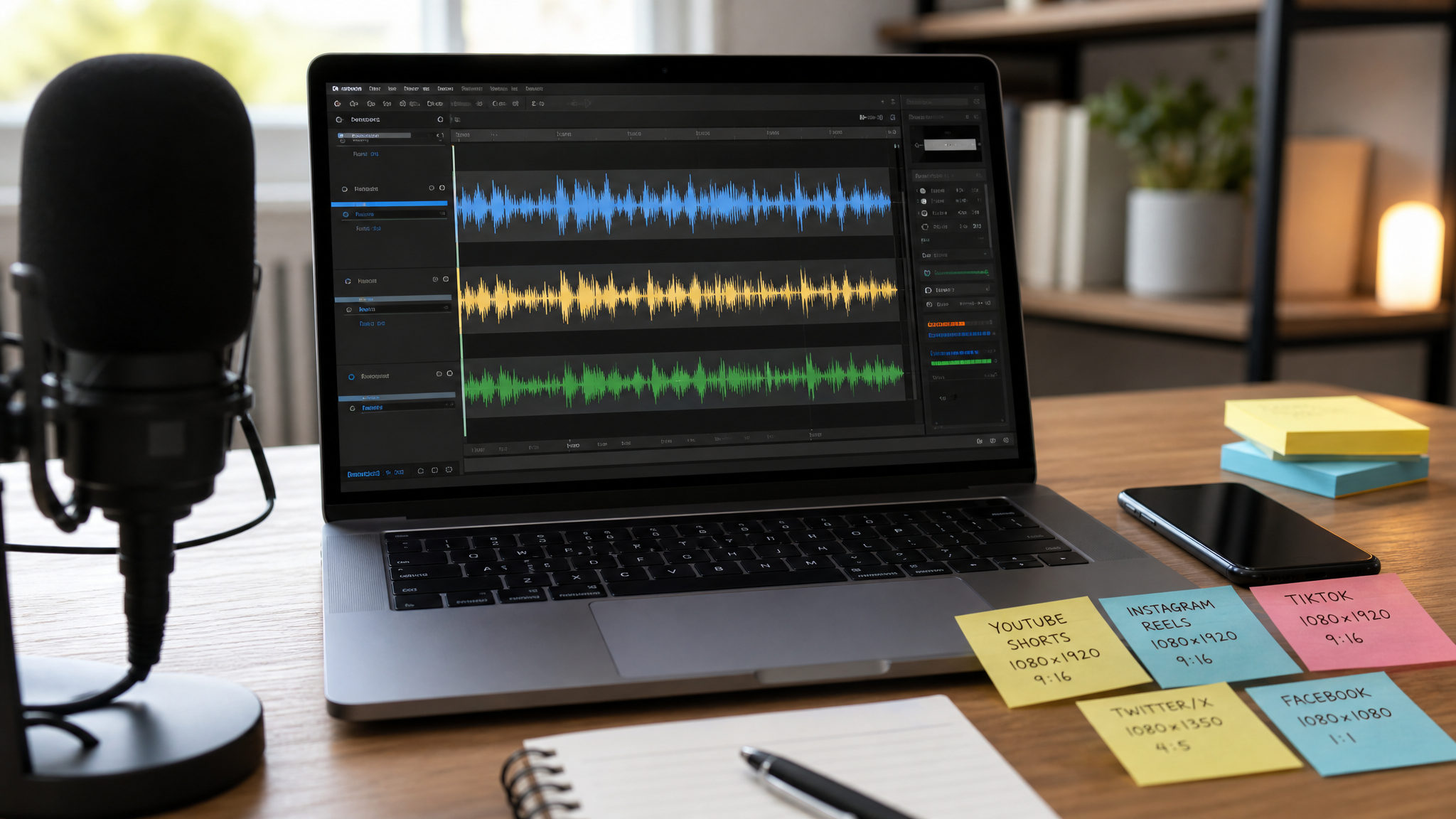
Vertical 9:16 is non-negotiable for YouTube Shorts, Instagram Reels, and TikTok. Square 1:1 works for standard feed posts on Instagram and Facebook. Horizontal 16:9 suits YouTube video tabs and LinkedIn native video. Trying to force a vertical cut into a LinkedIn feed or vice versa signals a lack of care — and algorithms notice too.
Decide Length
Short doesn't mean one-size-fits-all. A 15–30 second cut works as a pure hook that drives curiosity back to the full episode. A 30–60 second clip fits a crisp tip or insight. Stories, reactions, or multi-part explanations can stretch to 90 seconds before attention starts dropping. Match the length to the complexity of the idea, not to a single arbitrary rule.
Plan Batches
One well-chosen moment can produce multiple variants: a teaser for Stories, a longer tip cut for Reels, and a static quote card with b-roll for feeds. Build that thinking into your clip map before editing begins. Prepare format templates for each platform so your editor isn't making layout decisions from scratch every time — this alone can cut production time by 40% or more per episode.
Step 5: Edit Clean, Compelling Clips
Cut to the Hook
The hook has to land in the first one to two seconds, full stop. Viewers on short-form platforms will scroll past anything that starts with "So, um, today we're talking about…" Find the sharpest line in the segment and cut to it immediately. Everything before that line gets removed.
Polish Audio
Audio quality separates professional clips from amateur ones even more than visuals do. Tighten pauses, cut filler words, and normalize loudness to around -14 LUFS for streaming platforms. Inconsistent volume — a speaker who's quiet one moment and loud the next — will tank retention faster than a jump cut ever could.
Visual Framing
Jump cuts, punch-ins, and relevant b-roll hold visual attention through the duration of the clip. When you turn podcast into shorts, crop the speaker frame so the face sits in the upper third of the vertical canvas, keeping captions visible below without obscuring the eye-line. A tight, well-lit speaker frame on a clean background consistently outperforms a wide shot from across a podcast studio.
Step 6: Add Captions, Branding, and Calls-to-Action
Readable Captions
Burned-in captions are not optional for short-form video — 85% of social media video is watched without sound, according to Verizon Media research. Use large, high-contrast text that's readable on a phone screen in bright daylight. Highlight one or two keywords per sentence in a different color to guide the eye and reinforce the core message.
Brand System
Apply consistent fonts, brand colors, lower-thirds with the guest name and episode title, and a subtle waveform or progress bar. Visual consistency builds recognition over time. Someone who sees a dozen of your clips across platforms should be able to identify the show before they read a single word. A small logo watermark in a corner handles this without overwhelming the frame.
Clear CTAs
Every clip needs one focused call-to-action — not three. "Watch the full episode" links drive back to long-form content. "Follow for more" builds the audience. "Visit the link in bio" pushes traffic to a landing page. Choose based on your primary KPI from Step 1 and keep the CTA concise enough to appear in the last two to three seconds without feeling rushed.
Step 7: Optimize Metadata for Each Platform
Titles and Descriptions
Write titles that lead with the hook, not the episode number. "Episode 47" tells an algorithm and a new viewer almost nothing. A title like "Why Your Podcast Clips Aren't Getting Views (And How to Fix It)" does real work. Weave the primary keyword — how to repurpose a podcast into clips — into titles and descriptions where it fits naturally, not as a forced insertion at the end.
Hashtags and Keywords
Related keywords like "podcast clips," "podcast repurposing," and "turn podcast into shorts" belong in descriptions and in the first comment on platforms that surface them. Use three to eight targeted hashtags per platform rather than stacking 30 generic ones. Tag the guest and any brands mentioned; this extends reach to their audiences without spending a dollar on distribution.
Thumbnails and Covers
A thumbnail has about 50 milliseconds to earn a click. Design custom cover frames with three to five words in large, bold text and strong contrast between background and foreground. Avoid cluttered layouts — one clear image, one clear phrase, one clear color signal. Test two variants per clip batch and retire the lower performer after two weeks of data.
Step 8: Publish and Schedule Across Channels

Native Uploads
Upload directly to each platform rather than crossposting through a third-party tool whenever possible. YouTube, TikTok, and Instagram all reward native uploads with broader initial distribution. A video link from an outside source does not get the same algorithmic push as a file uploaded directly — that difference is measurable in early reach numbers.
Cadence and Timing
Drip three to five clips from a single episode over one to two weeks rather than posting everything at once. This extends the episode's shelf life, keeps your account active between recording sessions, and lets early clips build interest before later ones arrive. A new follower who discovers clip three might go back and watch clips one and two, which extends total watch time across your content.
Cross-Promotion
Pin the strongest clip on each profile, thread related cuts in the comments, and link back to the full episode in the bio and description. Podcast to social media repurposing becomes significantly more powerful when the guest, co-host, or sponsor also shares the clips — their audiences become part of your distribution network at no additional cost.
Step 9: Measure Results and Iterate the Workflow
Track Performance
Pull data weekly for the first month after a batch goes live. Retention curves show exactly where viewers are dropping off — if 60% of your audience leaves at the eight-second mark, that's a hook problem. Watch time, saves, and shares point to resonance. Click-through to the long-form episode tells you whether your podcast to social media strategy is actually moving people down the funnel.
Learn and Refine
After four to six weeks of data, patterns emerge. Certain hook styles outperform others. Topics related to a specific theme might get three times the saves of everything else. One guest's clips might consistently outperform solo episodes. Use those findings to inform which episodes you prioritize next and which segments you select — this is how podcast repurposing gets smarter over time, not just faster.
Scale Production
Once the workflow is proven, document every step as a standard operating procedure. A well-built SOP covers the full pipeline: transcript → highlights selection → editing → QA → scheduling → reporting. With that document in place, you can onboard a video editor or social media coordinator without the process falling apart. Templates for every platform, a shared clip map format, and a content calendar that batches editing sessions by episode — these are the building blocks of a system that produces podcast clips consistently at scale.
Podcast repurposing isn't about squeezing every last second of content out of an episode. It's about finding the moments that genuinely serve your audience on each platform, packaging them with care, and distributing them in a way that earns algorithmic and human attention alike. Follow these nine steps with discipline and the data will show you what to double down on — and your episodes will keep working long after the recording light goes off.